
Group @mentions lets you bring a whole group of colleagues onto a message in one action, instead of @mentioning each person separately.
You save a set of users as a named group, for example Chartering Group, and then mention that group on any message. It works by adding a person tag for every member of the group. That is different from a standard @mention of an individual, and the difference matters for archived messages, which is explained below.
Group @mentions is an add-on app, so it is only available once it has been enabled for your organisation.
How to @mention a group
- Open the message you want to share.
- Open the @mention Group app on that message.
- Choose the group you want to mention.
- Select @mention.
Every active member of the group is then added to the message as a person tag. The Activity panel records this with the group name and the list of people it tagged, alongside any comment you add for context.
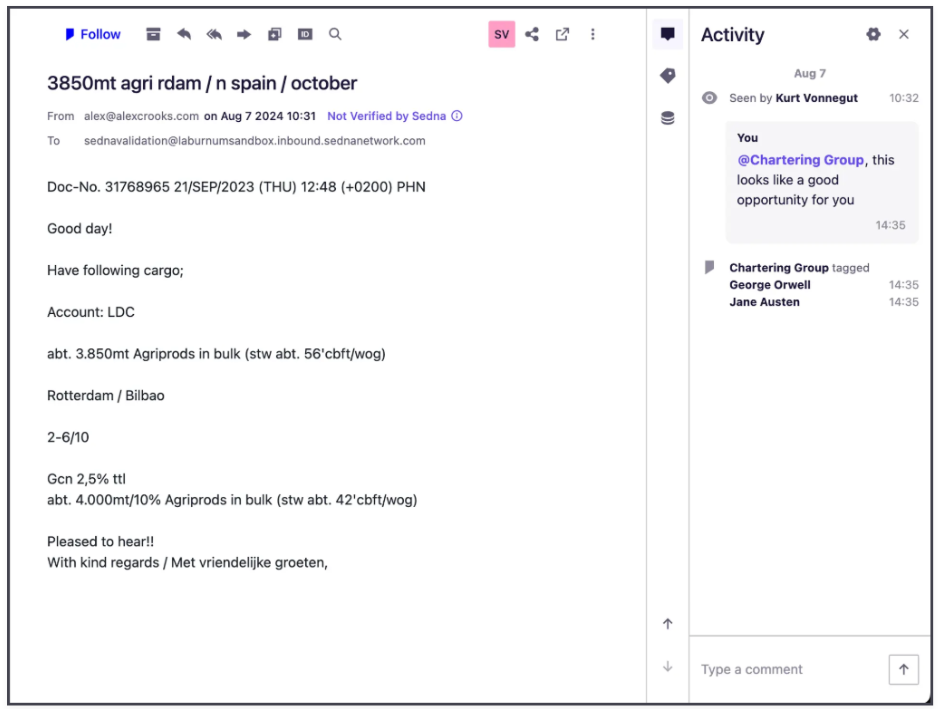
Activity panel after a group @mention
If your organisation has the group tag setting switched on, the message also receives a tag in the format group - {name}. This shows which group was mentioned and gives you something to search and filter on.
What a group @mention does not do
Archived messages
A group @mention does not unarchive a message. If a member has already archived the message, it stays in their archive.
A group @mention adds a person tag for each member, and adding a person tag leaves the message wherever it already sits for that user. A standard @mention of an individual in a comment behaves differently, because it moves the message from that person’s archive back into their inbox.
| Action | How it works | Archived message |
|---|---|---|
| @mention an individual in a comment | A direct @mention of that user | Returns to their inbox |
| @mention a group | Adds a person tag for each group member | Stays archived |
If you need a specific person to see a message they may already have archived, @mention them individually as well as mentioning the group.
The app does not send a notification of its own. Whether a member is alerted depends on their own Sedna notification settings for messages they are tagged on.
Managing groups
Groups are created, edited and deleted from the More menu inside the app. They are held as one shared list for your organisation, so a group created by one user is available to everyone who can use the app.
By default, anyone who can open the app can manage every group. If you would rather keep control with a few people, Sedna can set named users as group admins. Admins create, edit and delete groups, while everyone else can still mention a group and view its members.
Sedna can also limit the app to a specific team or list of users. The app still appears as an option for everyone, and users outside the list see a message that it is not available to them.
The app does not record who created a group, so agree a naming convention and a small set of owners before rolling it out widely.
Getting group @mentions enabled
Group @mentions is enabled per organisation by Sedna. To request it, contact your Customer Success Manager or raise a ticket with Sedna Support. It helps to tell us:
- Whether you want all users to manage groups, or named admins only
- Whether the app should be limited to particular teams or users
- Whether you want the group tag added to messages when a group is mentioned
FAQ
Is a group @mention the same as @mentioning each person?
Not quite. It tags each member on the message, which is enough to assign it to them, but it does not unarchive the message in the way an individual @mention does.
Why did a colleague not see a message I mentioned their group on?
The most likely reason is that they had already archived it. A group @mention adds a person tag and does not bring an archived message back to the inbox. @mention them individually to return it.
Can I see which group was mentioned on a message?
Yes. The Activity panel shows the group name and who it tagged. With the group tag setting on, the message also carries a group tag.
Can I see who created or changed a group?
No, this is not recorded today.
What happens when someone leaves a group or the company?
Only active users in a group are tagged. Remove or update members from the More menu in the app.
Still have a question? Contact Sedna Support.
Comments
0 comments
Please sign in to leave a comment.